WhatsApp’s January 2026 Update: 3 New Group Chat Features for Easier Messaging
In the ever-evolving landscape of instant messaging apps, WhatsApp continues to lead with innovative updates that enhance user experience. The WhatsApp January 2026 update introduces three game-changing group chat features: Member Tags, Text Stickers, and improved Event Reminders. These group messaging enhancements are designed to reduce confusion in large chats, boost creative expression, and ensure seamless event planning. As a Meta-owned platform with billions of users, WhatsApp’s new features 2026 focus on making group communication tools more intuitive and efficient.
Whether you’re coordinating family events, managing work teams, or chatting with friends, these WhatsApp group updates address common challenges like role identification, message visibility, and timely notifications. This comprehensive guide explores each feature in detail, including how-to steps, benefits, and tips for optimization. Backed by official announcements and expert insights, we’ll help you leverage these tools for better group chat organization and overall messaging efficiency.
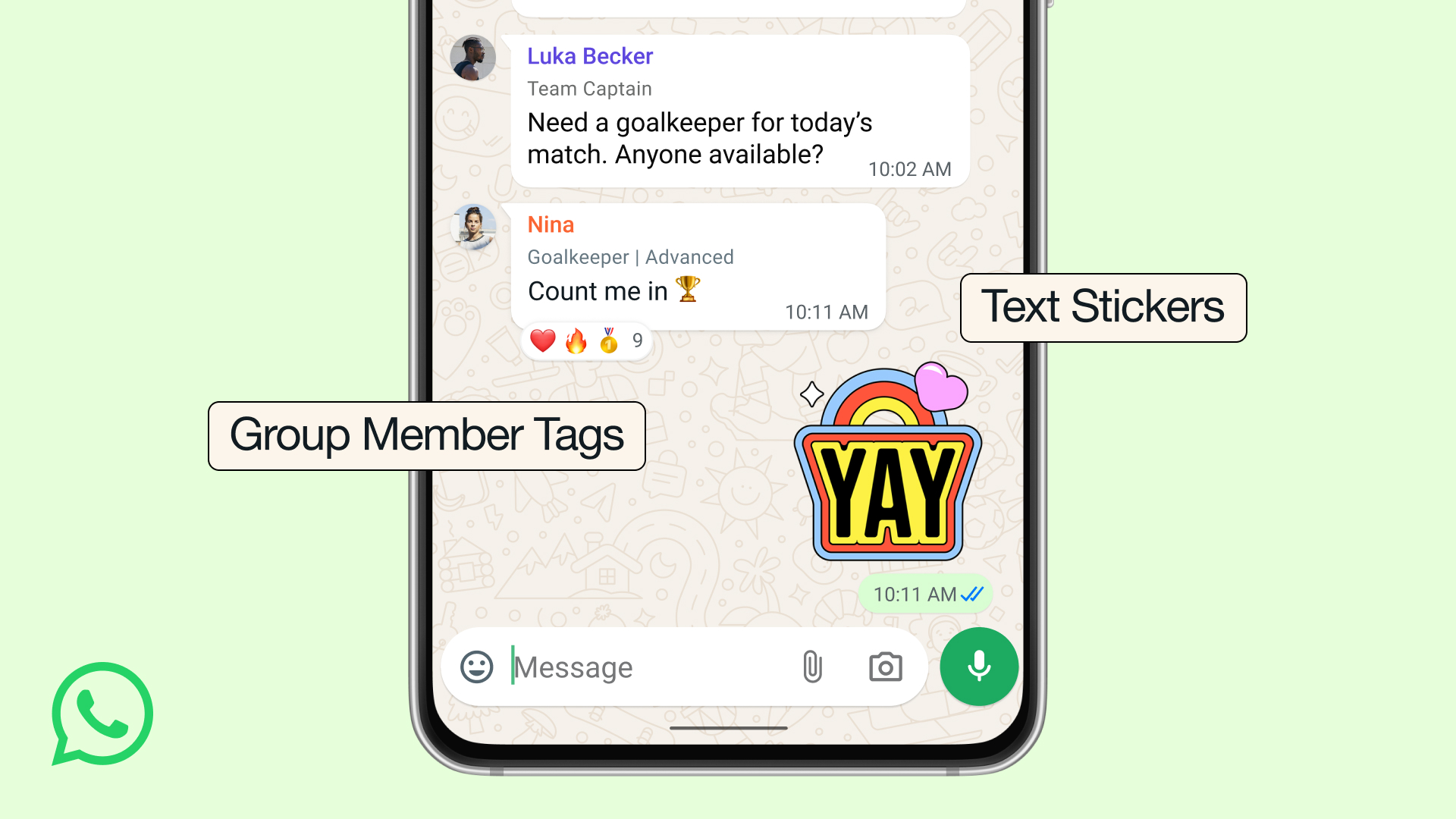
Customize Your WhatsApp Group Chats With New Member Tags, Text …
Overview of WhatsApp’s January 2026 Group Chat Update
Launched on January 7, 2026, this update builds on WhatsApp’s existing capabilities, such as end-to-end encryption, large group support (up to 1,024 members), and multimedia sharing. The focus here is on group chat improvements, aiming to minimize chaos in busy conversations. With features like custom member roles, instant sticker creation, and smart event alerts, users can expect reduced group confusion and enhanced coordination.
Available globally on Android, iOS, and desktop, the rollout is gradual—ensure your app is updated via the App Store or Google Play. These enhancements align with broader trends in messaging platforms, where semantic organization and user personalization drive engagement.
Member Tags: Personalize Your Role in Group Chats
Member Tags allow users to assign customizable labels to themselves in each group, providing instant context about identities and roles. This is one of the key WhatsApp group features for 2026, ideal for large or diverse chats.
How to Use Member Tags in WhatsApp
- Open the desired group chat.
- Tap the group name to access info.
- Select “Member Tag” under your profile.
- Enter a tag like “Team Lead” or “Event Planner” and confirm.
Tags are visible next to your name and are unique to each group, ensuring flexibility across different conversations.
Benefits of Member Tags for Group Messaging
- Clarity in Large Groups: Quickly identify roles, reducing mix-ups in community or professional settings.
- Enhanced Personalization: Tags like “Anna’s Dad” add a human touch to family or school groups.
- Improved Efficiency: Supports better group coordination by highlighting responsibilities.
According to WhatsApp, this feature is perfect for clubs, parent groups, or associations where not everyone knows each other.
WhatsApp Adds Member Tags and New Features to Group Chats
Text Stickers: Create Custom Stickers from Text for Expressive Chats
Text Stickers transform simple words into eye-catching visuals, making messages stand out in fast-paced group threads. This update elevates WhatsApp sticker tools, allowing for quick, creative expression without design skills.
How to Create and Use Text Stickers
- Access the sticker tray via the emoji button in any chat.
- Type your text (e.g., “Great Job!”) into Sticker Search.
- Generate and send the sticker, or add it directly to your custom pack.
No need to send first—save stickers for reuse in future conversations.
Advantages of Text Stickers in WhatsApp Groups
- Visual Emphasis: Highlight announcements or reactions in busy chats.
- Creativity Boost: Turn phrases into fun, reusable elements for themed groups.
- Time Efficiency: Instant creation streamlines group communication.
This feature reduces repetitive texting and adds flair to everyday messaging.
Event Reminders: Smart Alerts for Seamless Group Planning
Upgrading the existing event tool, Event Reminders now include customizable early notifications tailored to event types, helping users avoid missed plans.
Setting Up Event Reminders in WhatsApp
- In a group, tap “+” and choose “Event.”
- Input details: date, time, location.
- Customize reminders (e.g., 1 day for parties, 15 minutes for calls).
- Share—the app sends adaptive alerts to participants.
Reminders factor in logistics like travel time for in-person events.
Key Benefits for Group Event Management
- Reliability: Proactive alerts minimize no-shows.
- Customization: Adapt to different event needs, from virtual meetings to gatherings.
- Reduced Clutter: Fewer follow-up messages keep chats organized.
This enhancement makes WhatsApp a stronger tool for group event planning.

WhatsApp’s January 2026 Update Adds 3 New Group Chat Features for …
Overall Impact: How These Features Transform Group Chats
These WhatsApp 2026 updates collectively improve group messaging by promoting organization, expression, and reliability. From custom roles to instant stickers and smart notifications, users benefit from less confusion and more engaging interactions.
| Feature | Primary Benefit | Ideal Use Cases |
|---|---|---|
| Member Tags | Role Identification | Large communities, work teams |
| Text Stickers | Creative Message Highlighting | Fun groups, announcements |
| Event Reminders | Timely Notifications | Event planning, meetings |
Accessing the Update and Troubleshooting Tips
Update your app through official stores. If features aren’t visible, restart the device or check for beta enrollment. For issues, use WhatsApp’s in-app help.
FAQs: Answering Common Questions About WhatsApp’s 2026 Group Features
What is the WhatsApp January 2026 update about?
The update adds Member Tags, Text Stickers, and Event Reminders to enhance group chat organization and ease.
How do Member Tags work in WhatsApp groups?
Users can set group-specific labels like “Coach” to provide context, visible next to their name.
Can I create Text Stickers without sending them first?
Yes, generate via Sticker Search and add directly to your packs for future use.
What improvements do Event Reminders offer?
They provide customizable early alerts based on event type, such as commute reminders for parties.
Are these features available on all devices?
Yes, on Android, iOS, and desktop, with a gradual rollout starting January 7, 2026.
How do I update WhatsApp to get these group features?
Check the App Store or Google Play for updates, or enable auto-updates.
Can Member Tags be changed or removed?
Yes, edit or delete them anytime via group info settings.
Do Text Stickers support multiple languages?
Yes, they work with any text input, including emojis and non-English languages.
Will Event Reminders notify non-WhatsApp users?
No, they’re limited to group participants with the app.
How does this update improve group chat security?
While focused on usability, all features maintain WhatsApp’s end-to-end encryption.